2023/1/4) Update command list. (compatible with v0.27.1)
2023/7/7) Update command list. (compatible with v0.29.1)
2026/2/11) Update command list. (compatible with v0.38.3)
1.How to use command?
These commands can be used in “System Console”.
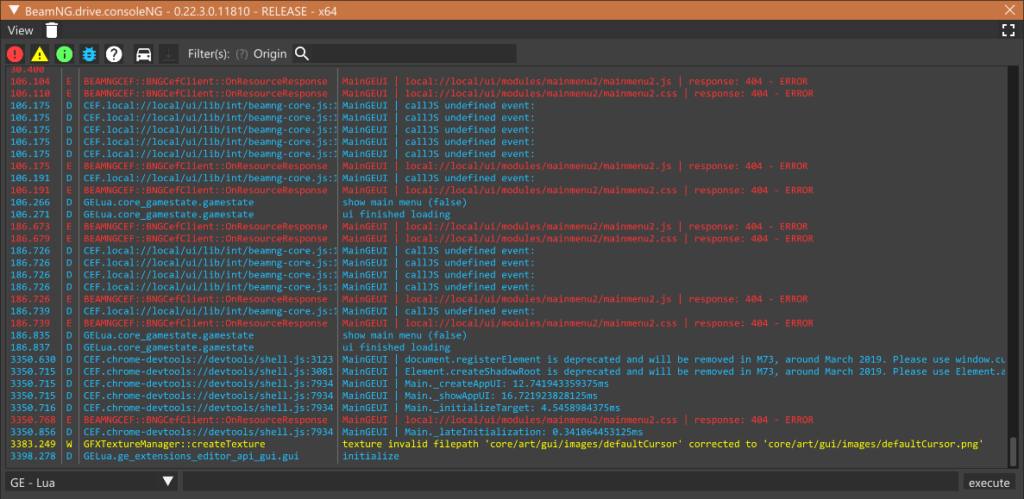
You can open it by pressing ^ key.
If not working, let see [Option -> CONTROLS] and look for “console”.
“System Console” has two type of console, one for whole game and the other for each vehicle.
- “GE – Lua”: a console for whole game
- “BeamNG – XX”: a console for each vehicle
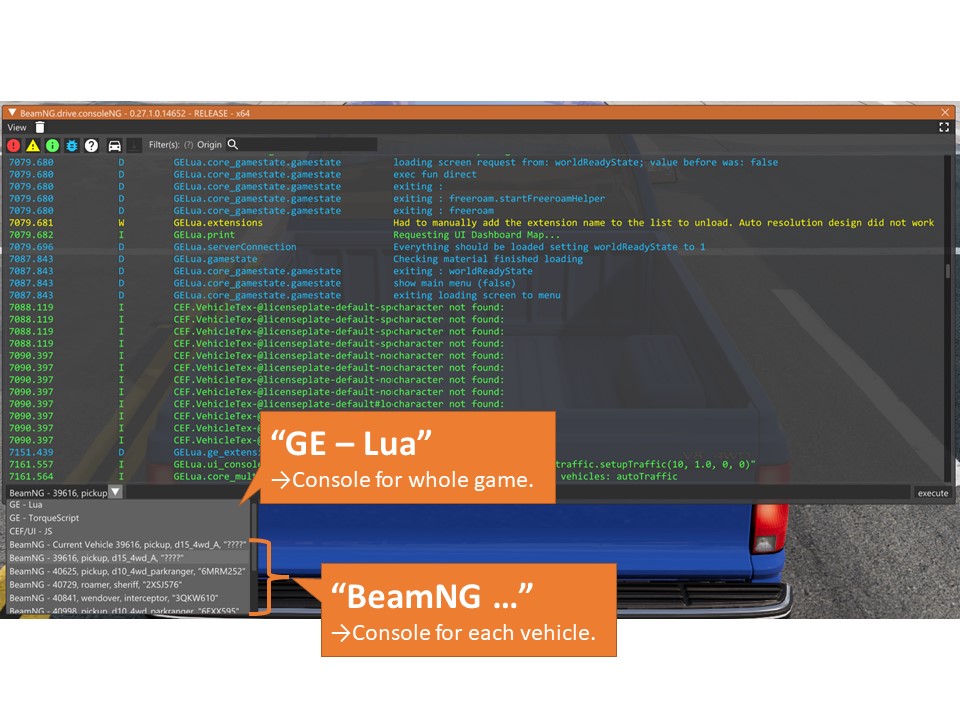
“GE – Lua” VS “BeamNG – XX”
If you want to execute command for all vehicles, use “GE – Lua” console, and execute command like this:
for vid, veh in activeVehiclesIterator() do veh:queueLuaCommand("THE COMMAND YOU WANT TO RUN") end
For example, if you want to explode all vehicles, you can execute like this:
for vid, veh in activeVehiclesIterator() do veh:queueLuaCommand("fire.explodeVehicle()") end
If you want to execute command for each vehicle, it is much more easy.
Select console for target vehicle, and just execute “THE COMMAND YOU WANT TO RUN“.
For example, if you want to explode a vechivle, only you have to do is executing this command.
fire.explodeVehicle()
From here, I show you funny and convenience command examples.
These are mainly for all vehicles, so if you want to execute for each, please replace like above.
2.Funny Commands
Command for destruction
Breaking All Hinges
for vid, veh in activeVehiclesIterator() do veh:queueLuaCommand("beamstate.breakHinges()") endBreaking Completely
for vid, veh in activeVehiclesIterator() do veh:queueLuaCommand("beamstate.breakAllBreakgroups()") endDeflate All Tires
for vid, veh in activeVehiclesIterator() do veh:queueLuaCommand("beamstate.deflateTires()") endIgnite All Vehicle
for vid, veh in activeVehiclesIterator() do veh:queueLuaCommand("fire.igniteVehicle()") endExplode All Vehicle
for vid, veh in activeVehiclesIterator() do veh:queueLuaCommand("fire.explodeVehicle()") endExtinguish All Vehicle
for vid, veh in activeVehiclesIterator() do veh:queueLuaCommand("fire.extinguishVehicle()") endCommand for Force Field
Enable/Disable force field
extensions.gameplay_forceField.toggleActive()Enforce force field
extensions.gameplay_forceField.setForceMultiplier(10)(“10” is a multiplier. Negative value means force toward to player.)
Command for Forced Acceleration
Accelerate all vehicle
for vid, veh in activeVehiclesIterator() do veh:queueLuaCommand("thrusters.applyVelocity(obj:getDirectionVector() * 100)") end(“100” is a multiplier. This is three times the km/h unit. 100 means 300km/h)
3.Convenience Commands
Command for electrics( for ALL VECHICLE )
Toggle Left Signal
for vid, veh in activeVehiclesIterator() do veh:queueLuaCommand("electrics.toggle_left_signal()") endToggle Right Signal
for vid, veh in activeVehiclesIterator() do veh:queueLuaCommand("electrics.toggle_right_signal()") endToggle Warn Signal
for vid, veh in activeVehiclesIterator() do veh:queueLuaCommand("electrics.toggle_warn_signal()") endTurn ON a Light
for vid, veh in activeVehiclesIterator() do veh:queueLuaCommand("electrics.setLightsState(1)") endTurn ON a High Beam
for vid, veh in activeVehiclesIterator() do veh:queueLuaCommand("electrics.setLightsState(2)") endTurn OFF a Light
for vid, veh in activeVehiclesIterator() do veh:queueLuaCommand("electrics.setLightsState(0)") endTurn ON/OFF a Fog light
for vid, veh in activeVehiclesIterator() do veh:queueLuaCommand("electrics.toggle_fog_lights()") endIf a vehicle has underglow lights, this command also affects to them.
If a vehicle has no fog lights, this command affects nothing.
Turn ON a Lightbar Signal
for vid, veh in activeVehiclesIterator() do veh:queueLuaCommand("electrics.set_lightbar_signal(1)") endIf a vehicle has no lightbar, this command affects nothing.
Turn ON a Lightbar Signal and Sound a Siren
for vid, veh in activeVehiclesIterator() do veh:queueLuaCommand("electrics.set_lightbar_signal(2)") endIf a vehicle has no lightbar, this command affects nothing.
Turn OFF a Lightbar and Siren
for vid, veh in activeVehiclesIterator() do veh:queueLuaCommand("electrics.set_lightbar_signal(0)") endIf a vehicle has no lightbar, this command affects nothing.
Command for AI
Set AI mode for each vehicle
ai.setMode('<mode>')mode: ‘flee’, ‘chase’, ‘follow’, ‘traffic’, ‘random’
Stop AI for each vehicle
ai.setMode('disabled')Generate Traffic
gameplay_traffic.setupTraffic(maxAmount, policeRatio, extraAmount, parkedAmount)maxAmount: Number of vehicles. Specify an integer value greater than or equal to 0. If -1 is specified, it follows the setting value of the option.
policeRatio: Police ratio. Specify a value between 0.0 and 1.0. (0.0=no police car, 1.0=all police cars)
extraAmount: I don’t know what this mean. Set 0 is working. . .
parkedAmount: Number of parked vehicles. Specify an integer value greater than or equal to 0. If -1 is specified, it follows the setting value of the option.
Delete Traffic
gameplay_traffic.deleteVehicles()Change AI Role
gameplay_traffic.getTrafficData()[<Vehicle ID>]:setRole('<Role Name>')Role Name: “police”, “suspect”, “standard”, “service”
Set AI path for all vehicles
for vid, veh in activeVehiclesIterator() do veh:queueLuaCommand("ai.driveUsingPath{wpTargetList={'xx', 'yy'}, noOfLaps = 1, aggression = 1.0}")) endMore info about this command↓

Command for spawn vehicle
Spawn New Vehicle
core_vehicles.spawnNewVehicle('Model Key', {config = { linkedPCFile = '.pc File Name'}})Model Key: like BX-Series = bx. (mappings is here)
.pc File Name: just .pc file name (not a path)
e.g. spawning Pro Drift configuration in BX-Series.
core_vehicles.spawnNewVehicle('bx', {config = { linkedPCFile = 'pro_drift_M.pc'}})Clone Player Vehicle
core_vehicles.cloneCurrent()Remove Current Vehicle
core_vehicles.removeCurrent()Remove Other Vehicle
core_vehicles.removeAllExceptCurrent()Remove All Vehicle
core_vehicles.removeAll()Other
Reset All Vehicles (fix collapsed skin)
for vid, veh in activeVehiclesIterator() do veh:requestReset() veh:resetBrokenFlexMesh() end
コメント / COMMENT
имстмисчуап
Thank You. Very helpful
srteredtdtrfzhdfrtgzdgfgfdsgdfsfdggdf
Such a valuable resource.